

AMAZON BUSINESS
Savings Insights
Applies AI to past purchasing data to highlight potential savings on repeat buys. By surfacing these insights earlier, procurement leaders gain a more proactive approach to guiding decisions, helping teams move beyond merely reviewing spend and toward smarter purchasing going forward.
Impact: Transforms how businesses optimize their spend by automating the tedious process of comparing prices and finding alternatives across the vast selection of products.
My Role: Lead UX Designer
Team: Principal Product Manager, UX Researcher, UX writer, 8 Backend Developers, 3 Frontend UI developers.
Partnership: Purchase Control team to incorporate anomaly detection capabilities into this framework.
Leadership: Design Director, Product Director & Tech Director
Press release here


Amazon Business Vice President presenting 'Saving Insight' at the Reshape conference.

Why is Savings Insight important?
Cost Optimization
-
Identifies lower-cost alternative products that meet the same specifications
-
Highlights quantity discounts or tiered pricing opportunities
Procurement Efficiency
-
Reduces time spent searching for the best deals across multiple suppliers
-
Simplifies comparison shopping within Amazon's vast catalog
-
Streamlines reordering of frequently purchased items at better prices
Budget Management
-
Helps purchasers stay within departmental or project-specific budgets
-
Provides forecasting tools to anticipate future spend based on historical data
-
Identifies potential savings opportunities before purchases are made
Spend Visibility
-
Highlight opportunities to consolidate purchases for better pricing
Compliance Support
-
Recommends products that align with corporate procurement policies
Who are the users?
Procurement Administrator
They are responsible for optimizing organizational spend and ensuring cost-effective purchasing.
Need: Savings Insights to identify lower-cost alternatives that meet the same specifications as currently purchased items.

Business Unit Leaders
Decision-makers who manage departmental budgets and need to optimize spending within their units.
Need: Savings Insights to identify cost-saving opportunities specific to their department's purchasing patterns.

Category Managers
They manage specific procurement categories and need to balance cost optimization with supplier relationship management.
Need: Savings Insights to make informed decisions about product alternatives within their category expertise.
Customer Problem
Manually researching alternative products across multiple suppliers
Comparing specifications to ensure alternatives meet requirements
Tracking price changes across thousands of items
Satisfying stakeholders with cost effectiveness
Information spread across multiple systems and sources
Resistant to switching products or suppliers by the team
Need for strong business cases to justify changes


Customer Connect Calls
Top VOCs on Savings-based Insights
“That's the problem I have with analytics. Even with my own teams, insights are their own thing, but actions are the important example: coffee. If I know my team buys $70k in coffee, and we do different types of coffee (different choices). If they always buy Keurig, and they're buying it in this size, if we were to buy it in this other size and packaging, we would get 20% savings. Give me that recommendation. Tell me that. I don't need the dashboard,
I need the insight.” – Customer 1
“If we go through 12 pens per week vs. 12 pens per year, recommend that we purchase at an accelerated frequency.” - Customer 2
“I want to know what the next best cheaper product is of the top 10 most bought items.” – Customer 3
“What is being bought when there is a similar product at a lower cost?” – Customer 4
Mapping the Ecosystem
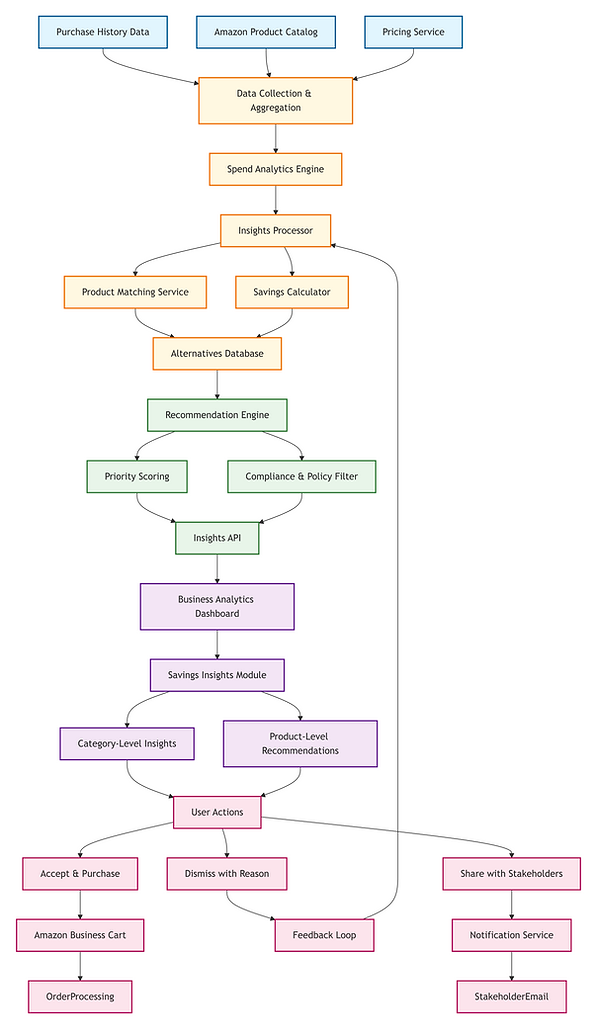
1. Data Collection & Processing
-
Purchase History Data: Historical procurement data from Amazon Business accounts
-
Product Catalog: Complete Amazon Business product database
-
Pricing Data: Real-time and historical pricing information
-
Data Aggregator: Collects and normalizes data from multiple sources
-
Spend Analytics Engine: Analyzes spending patterns and identifies potential optimization opportunities
2. Insights Generation
-
Insights Processor: Core engine that applies business rules to identify savings opportunities
-
Product Matcher: Identifies similar or identical products that could substitute for purchased items
-
Savings Calculator: Computes potential savings based on price differentials and purchase volumes
-
Alternatives Database: Stores matched product alternatives with savings calculations
3. Recommendation Engine
-
Priority Scorer: Ranks recommendations based on potential impact, confidence, and relevance
-
Compliance Filter: Ensures recommendations align with customer procurement policies
-
Insights API: Provides standardized access to recommendations for front-end consumption
4. User Interface
-
Business Analytics Dashboard: Main entry point for Amazon Business Analytics
-
Savings Insights Module: Dedicated interface for savings recommendations
-
Category View: Aggregated savings opportunities by product category
-
Product View: Detailed product-level recommendations with comparisons
5. User Actions & Feedback Loop
-
User Actions: Various actions users can take on recommendations
-
Accept & Purchase: Direct path to implement recommendations
-
Dismiss with Reason: Capture feedback for improving future recommendations
-
Share with Stakeholders: Collaboration feature for procurement teams
-
Feedback Loop: Continuous improvement mechanism for recommendation quality
Insights Model
For deep dive analysis, the product manager and I conducted a workshop with Customer Advisory Board to understand what types of savings-based insights they would like us to offer.
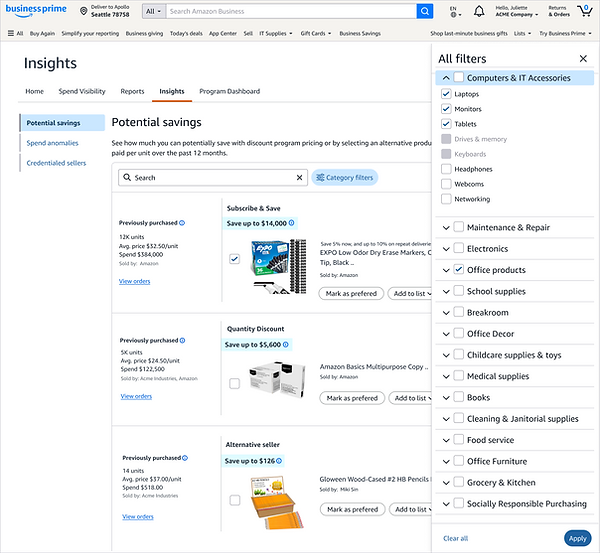
Subscribe and Save
Alternative product
Alternative seller
Quantity discount
4 TYPES of Savings Insights

SAVING
INSIGHTS
SAVING
INSIGHTS
Designs tents
-
Trust through Transparency: Build confidence in recommendations by showing clear comparisons
-
Efficiency through Focus: Respect the Category Manager's time by prioritizing high-impact opportunities
-
Contextual Intelligence: Present insights within the broader procurement context, not in isolation
-
Actionable Next Steps: Ensure recommendations lead to clear actions with measurable outcomes
Anti-patterns
-
Black Box Recommendations: Providing savings suggestions without a clear explanation
-
Data Overload: Showing all possible alternatives without intelligent filtering
-
Rigid UI: Forcing a one-size-fits-all approach to savings implementation

Goal
'Not a tool but a digital teammate'
Launch savings-based insights in Amazon Business Analytics to provide customers with actionable cost-reduction recommendations that
1. Reduce analytical complexity
2. Accelerate access to high-impact, data-driven insights
3. Expedite decision-making
UX Explorations


UX for Usability Study

Research findings


Savings Insights Impact
Predicts Future Spending Needs
Using ML models to forecast organizational needs and recommend optimal purchase timing to take advantage of price fluctuations or volume discounts.
Provides Category-Specific Insights
Delivering specialized recommendations tailored to each procurement category's unique characteristics and requirements.
Enables Collaborative Decision-Making
Allowing multiple stakeholders to evaluate recommendations,
add comments, and track decision outcomes.

Visual Design Details
Sharing more context on the visual design of the side navigation, as it was not part of the existing design system. For this, I worked first with my internal team and aligned on the initial design direction.

Next, I took it to the design system team for their input as well, so that we could contribute it to the system and build a component that is not just limited to our feature but spans across the product line. This way I was able to final on the visual design of a global component.

Success Metric
The effectiveness of the 'Savings Insights' will be measured through the UX Key Performance Indicators (KPIs):
Using prompts in AI, I created a UX Success Scorecard to track these metrics quarterly. It aligns UX design performance directly with the business goals we had identified.
CATEGORY
PRIMARY UX METRIC
GOAL
Efficiency
Task Completion Time
Reduce research time by 40%
Trust
Recommendation Acceptance Rate
> 25% of insights lead to a purchase
Accuracy
Dismissal Rate
< 10% of insights dismissed as "Irrelevant"
Impact
Total Realized Savings
$X saved per department per quarter

Design Prototype

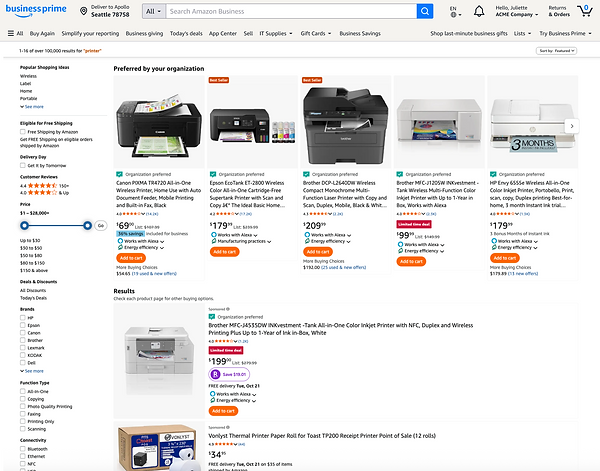
UX Feature Mocks



User Feedback Loop
With the help of AI, I created a User feedback loop for the team to use after the implementation of the feature.
A robust User Feedback Loop is essential to move from "Static Intelligence" to "Actionable Next Steps." Since the goal is to be a "digital teammate", the feedback loop should not just collect data but actively refine the AI's relevance.
Insight Generation
User Action & Dismiss
Feedback Collection
Model Refinement
“At Amazon Business, we don’t just listen to our customers—we immerse ourselves in their challenges. Savings Insights is about more than just saving money; it’s about giving our customers the confidence to make smarter decisions, faster.”
- Stephanie Lang, Director and General Manager, Amazon Business
